Three buyers shop this category in the same week. One wants the video back, with clips for a deal review. One refuses to let anything visibly join a client call. One is a single person with an iPhone who wants the whole thing to cost under a hundred dollars a year.
They will not end up in the same place. tl;dv, Jamie, and AmyNote disagree about the three things that decide the bill: whether a bot appears in the meeting, whether you pay per seat or per meeting, and where the audio goes afterward.
That last disagreement is the one buyers underweight. Two of these tools keep your transcripts on their infrastructure and one keeps them on your phone, and no amount of feature comparison resolves that difference — it is an architecture choice you either need or do not. All pricing below was verified against each vendor's own pricing page in August 2026.
Quick Verdict
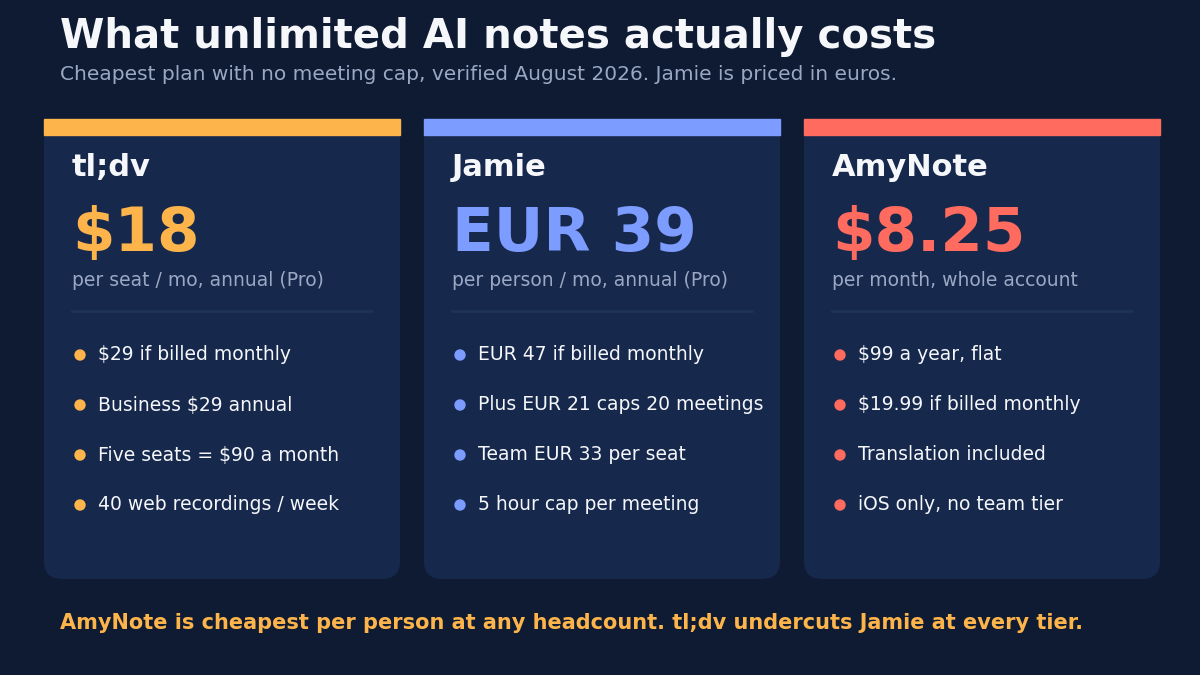
Pick tl;dv if you need the video. It is the only one here that records and clips the actual call, and its team pricing dropped hard this year. Business is now 29 dollars per seat per month billed annually, down from the 59 it listed earlier in 2026.
Pick Jamie if a bot can never appear. It captures device audio on desktop and mobile, so online, hybrid, and in-person meetings all work the same way, and in-person recording is available even on the free plan. It is hosted in the EU and deletes audio after transcription.
Pick AmyNote if you are one person who wants a flat bill. It is 99 dollars a year for the whole account, transcribes 140 plus languages, and keeps transcripts on your device. It is also iOS only, which rules it out for many readers immediately.
What We Compared
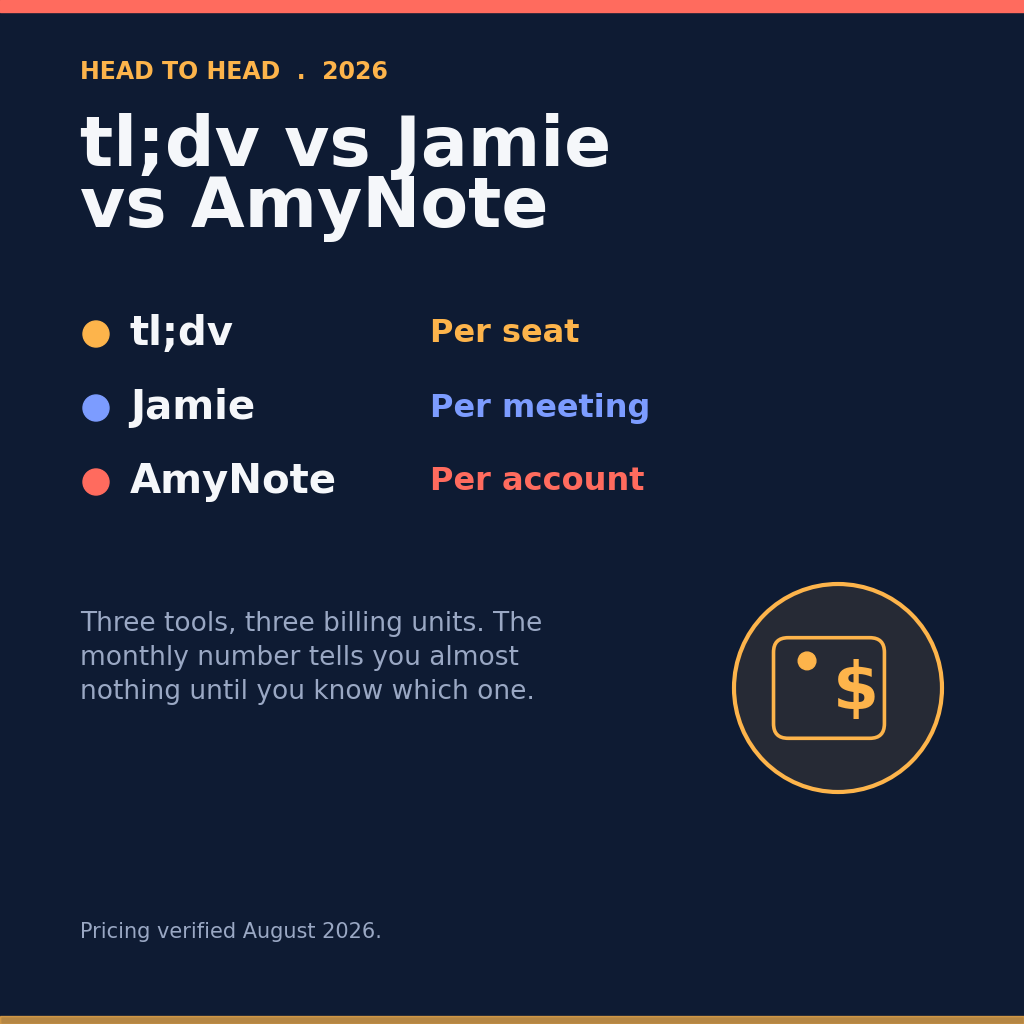
We checked list prices, the limits buried in the plan comparison tables, how each tool captures audio, language coverage, and data handling. The key finding: these three do not share a billing unit. tl;dv charges per seat. Jamie charges per person but rations you by meeting count until its top personal tier. AmyNote charges one flat account price.
Comparing monthly numbers without that context gives the wrong answer, and it gives it confidently. A 21 euro plan that stops at 20 meetings and an 18 dollar plan that stops at nothing are not two points on the same scale. The first question is not how much, it is how much of what.
tl;dv: Video Is the Whole Point
Strengths. tl;dv records video, not just audio, and that is hard to replace. Free users get unlimited video recordings and unlimited transcription in 30 plus languages, an unusually generous start. The paid ladder is now cheap for the category: Pro is 18 dollars per seat monthly on annual billing or 29 monthly, Business 29 annually or 39 monthly. Business adds premium transcription, multi-language meetings, and custom vocabulary. Mobile apps exist on iOS and Android, with unlimited weekly mobile recording on every tier.
The Business price cut is the real story here. Dropping from 59 to 29 dollars per seat is not a promotion, it is a repositioning — and it lands tl;dv underneath Jamie's individual Pro plan while offering a feature Jamie does not have at all. If clips are your work product, this is the cheapest that capability has been.
Weaknesses. For web meetings tl;dv sends a bot, and the fact that Pro sells custom bot appearance as a feature tells you the bot is not going away. If it were on the roadmap to remove, they would not be charging you to redecorate it.
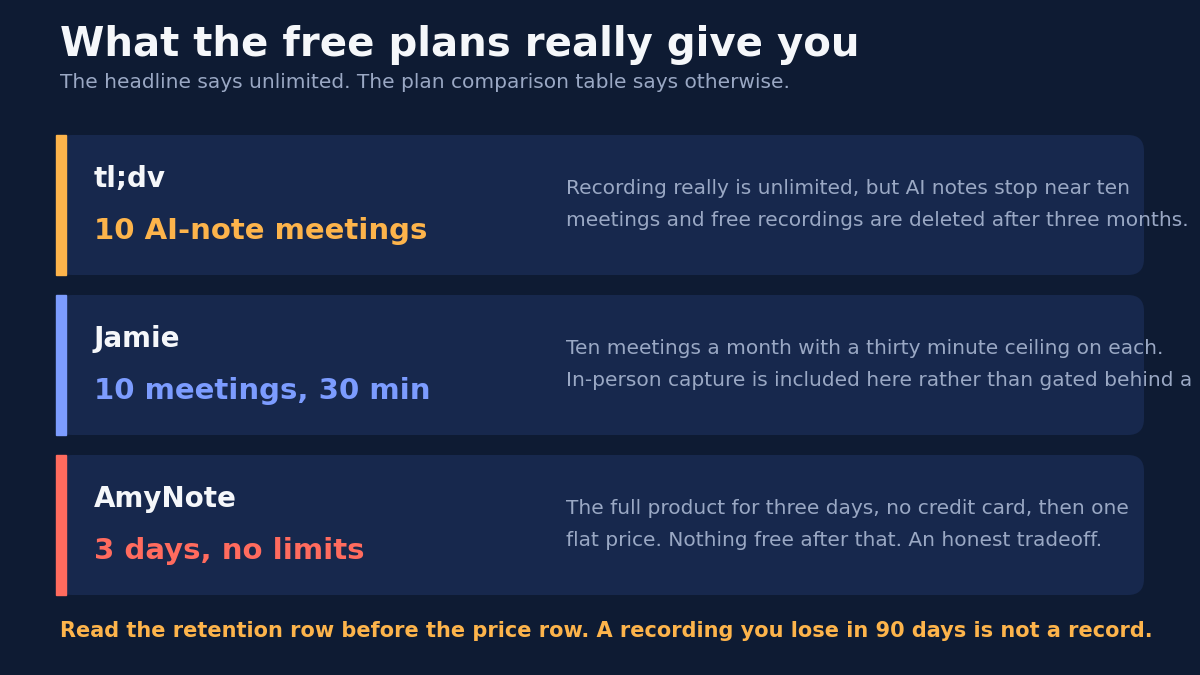
The free plan looks unlimited until you read the comparison table: AI notes stop after roughly 10 meetings, retention runs up to three months, uploads cap at five, and web recording is limited to 40 per week. Every tier caps a recording at three hours. Language coverage of 30 plus is the narrowest here. And the pricing is per seat, so five people on Business is 145 dollars a month — the cheap headline price is a per-person price, and it multiplies.
Read the retention line before the price line. A free recording deleted at three months is a demo of the product, not an archive of your meetings, and the gap between those two things is where the upgrade pressure lives.
Jamie: The Bot-Free Purist
Strengths. Jamie is the purest bot-free option here. It captures audio from your device rather than joining the call, so any online platform, hybrid room, or in-person meeting works the same way, and in-person capture is included on the free plan rather than gated behind an upgrade.
It runs on Mac, Windows, iOS, and Android — the broadest platform coverage of the three by a wide margin — claims notes and transcripts in 99 plus languages, and includes speaker recognition with cross-meeting memory plus task detection on every tier rather than reserving them for the top plan.
The privacy posture is the strongest on paper: EU hosting and data residency, GDPR compliance, no model training by Jamie or its model providers, AES 256 at rest, ISO 27001, and meeting audio deleted after transcription. For a European buyer with a procurement review to clear, that list is the product.
Weaknesses. Jamie is expensive and priced in euros, which for a dollar-budgeted team is a moving target rather than a number. The free plan gives 10 meetings a month with a 30 minute cap, a demo rather than a workflow.
Plus is 21 euros monthly on annual billing or 25 monthly, and still buys only 20 meetings with a two hour cap. Unlimited meetings require Pro at 39 euros annually or 47 monthly, the most expensive individual plan here by a wide margin. Price Pro, not Plus — 20 meetings a month sounds ample until you count the recurring ones, and a cap you hit in the third week is a cap you will pay to remove.
Even Pro caps a meeting at five hours. Custom vocabulary stops at 50 terms below the team tiers, which matters more than it sounds if your calls are full of product names. And SOC 2 Type II is listed as pending rather than achieved — a distinction most reviewers will not let you round off.
AmyNote: One Price, One Platform
Strengths. AmyNote is flat-priced at 99 dollars a year, or 19.99 a month, covering the account rather than a seat. The trial is three days with no credit card. It transcribes 140 plus languages and translates into 100 plus, the broadest coverage here, and is tuned for East Asian and Arabic languages where the other two are thin.
Transcription runs on OpenAI's latest Speech API and analysis on Anthropic's Claude Opus, and both providers contractually guarantee zero training on user data. Audio is encrypted in transit and not retained after processing, and transcripts are stored locally with end to end encryption. It records in-person conversations natively, with cross-session speaker identification and semantic search.
The flat price is the structural argument. Per-seat pricing means the tool gets more expensive as it gets more useful to your organization; a flat account price does not. That is a smaller advantage for one person than it sounds and a larger one than it sounds for anyone who expects to add people.
Weaknesses. AmyNote is iOS only. No Android app, no desktop client — a hard stop for Windows shops and anyone who works on a laptop, and there is no partial version of that constraint.
It does not record video, so the clip-sharing workflow tl;dv is built around does not exist. There are no CRM integrations, no team features, no admin console, no SSO. Brand recognition is small next to both competitors. These are not oversights so much as the reason the price is one number instead of a per-seat schedule.
What “Free” Actually Means Here
All three advertise something free and all three mean something different by it. This is the fastest way to lose two weeks of evaluation, so it is worth being precise.
| Tool | What “free” means | What it is good for |
|---|---|---|
| tl;dv | Unlimited video recording, but AI notes stop near 10 meetings and free recordings are deleted after three months | Seeing the video workflow, not keeping anything |
| Jamie | 10 meetings a month with a 30 minute ceiling on each, in-person capture included | Testing bot-free capture on short calls |
| AmyNote | 3 days, full product, no credit card — then one flat price | Testing it against a real, unmodified work week |
Where the Three Actually Diverge
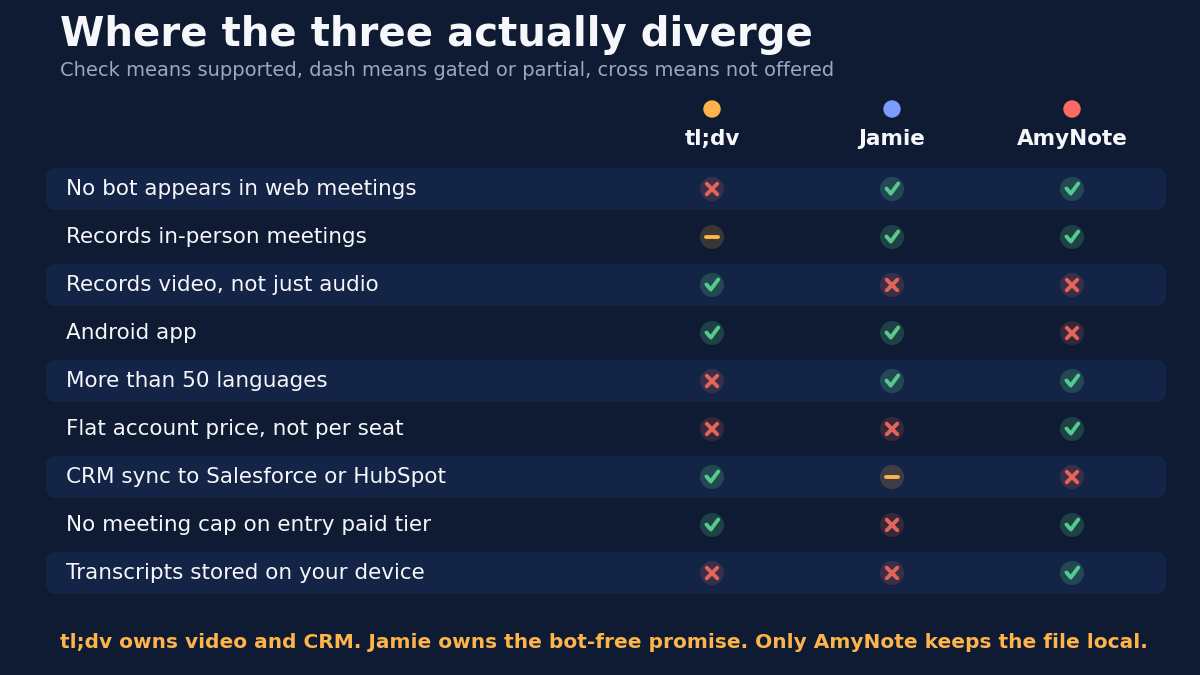
Strip out the marketing and the differences collapse into a short list of yes-or-no questions. Each one has eliminated a tool for somebody this month.
Side by Side
- Billing unit. tl;dv per seat. Jamie per person, with meetings rationed below the top personal tier. AmyNote one flat account price.
- Entry price for unlimited AI notes. tl;dv Pro at 18 dollars per seat monthly on annual billing. Jamie Pro at 39 euros. AmyNote at roughly 8.25 dollars a month annually.
- Bot in the meeting. tl;dv sends one for web calls. Neither Jamie nor AmyNote ever does.
- In-person meetings. Jamie on every tier including free. AmyNote natively. tl;dv only through its mobile app.
- Languages. AmyNote 140 plus. Jamie 99 plus. tl;dv 30 plus.
- Platforms. Jamie covers Mac, Windows, iOS, Android. tl;dv is web plus mobile. AmyNote is iOS only.
- Video. Only tl;dv. CRM. tl;dv and Jamie only.
- Where transcripts live. tl;dv and Jamie in the cloud, Jamie in the EU. Only AmyNote keeps them on your device.
- Hard caps. tl;dv limits recordings to three hours and free retention to three months. Jamie caps meeting length by tier, 30 minutes free to five hours. AmyNote sells no minute caps.
How to Decide in Five Minutes
Most of this decision collapses into four questions asked in order. Answer them honestly and the shortlist writes itself before you open a single trial.
- Is anyone on Android or a desktop? If yes, AmyNote is out at question one and nothing further about it matters. Start here, because it is the fastest disqualifier on the list.
- Does the work product need to be a video clip? If a deal review or a handoff means sending someone 90 seconds of the actual call, only tl;dv does that, and you accept the bot for web meetings as the price.
- Can a bot appear in front of a client? If the answer is no as a matter of policy rather than preference, tl;dv is out for web calls, and you are choosing between Jamie and AmyNote on platform.
- Where does the transcript have to live? EU residency points to Jamie. On-device storage points to AmyNote. If neither is a requirement, this question does not cost you anything — but it is the one that is hardest to change later.
Whatever survives all four is your answer. Usually only one does, and usually it was decided at question one or three.
The Bottom Line
If your work product is a video clip and you are buying for a team, tl;dv is hard to beat on price now, and this year's Business cut makes it the cheapest per-person option here apart from AmyNote. Accept the bot and the three month retention window on free.
If the bot is the dealbreaker and your data has to stay in Europe, Jamie is the most complete answer here, and the only one whose free tier records an in-person meeting. You will pay for it, in euros, and price Pro rather than Plus because the 20 meeting cap arrives faster than expected.
If you are a solo professional on an iPhone who mostly sits in real rooms, especially rooms that are not English-speaking, AmyNote gives the widest language coverage and the only architecture here that keeps the transcript on your own device, for a flat 99 dollars a year. Go in knowing what you give up: no Android, no desktop, no video, no CRM. Three days free at amynote.app, no credit card, no seats to count.
None of these is the best tool for everyone. They are the best tool for three different people, and the 2026 pricing pages make that clearer than a year ago — not because the tools converged, but because each one finally priced itself for the buyer it was always built for.
Originally published as an X Article by @AmyNoteApp.