You sit down across the table from a client. No Zoom link, no calendar bot to invite, just two people and a conversation that matters. Twenty minutes in, someone commits to a deadline and you scribble half of it before the next point buries it. Most AI note-takers were built for the video call, where a bot slips into the participant list and records everything automatically. Take that same tool into a room and it has nothing to join, no meeting URL to sit inside, no cloud stream to tap. In-person is where the popular meeting assistants quietly fall apart, and where a smaller set of tools genuinely shine. Here is how four of them compare for the meetings that happen face to face, checked against current vendor pages as of August 2026.
Quick Verdict
Plaud if you want a dedicated hardware recorder you can leave on the table and forget, and you do not mind buying a device plus a subscription.
Otter if you want a familiar mobile app with live captions and you mostly work in English, French, or Spanish.
Granola if you take in-person notes with a laptop open and you value a clean, private notepad over portability.
AmyNote if the meetings you keep losing happen in rooms and in the field, in many languages, and you want them captured from the phone already in your pocket with nothing left in a vendor's cloud.
What Makes In-Person Different
Online meeting tools have an easy job: the audio is already digital, and a bot can join the call to grab it. A room offers neither, only the sound bouncing around a table. That single fact changes what matters, and it is why a tool that dominates your Zoom week can be useless the moment you walk into a conference room, a job site, or a coffee shop.
- Capture device. Something physically in the room has to hear the conversation, whether that is a recorder, a laptop mic, or the phone in your hand. There is no stream to tap and no participant list to slip into.
- Portability. In-person often means a coffee shop, a job site, or a hallway, not a desk. A tool tied to a laptop is a tool you left at the office, and a tool tied to a scheduled calendar invite never had anything to attach to.
- Privacy. Room audio is candid and often sensitive. Where that recording goes, and whether anyone trains a model on it, is not a footnote — it is the whole question when the conversation is a client's finances, a patient, or a deal.
Each tool below answers those three questions differently, and both its strengths and its hard limits flow directly from that answer. Keep the framing in mind as you read: what physically sits in the room, how far it travels, and where the recording lives afterward.
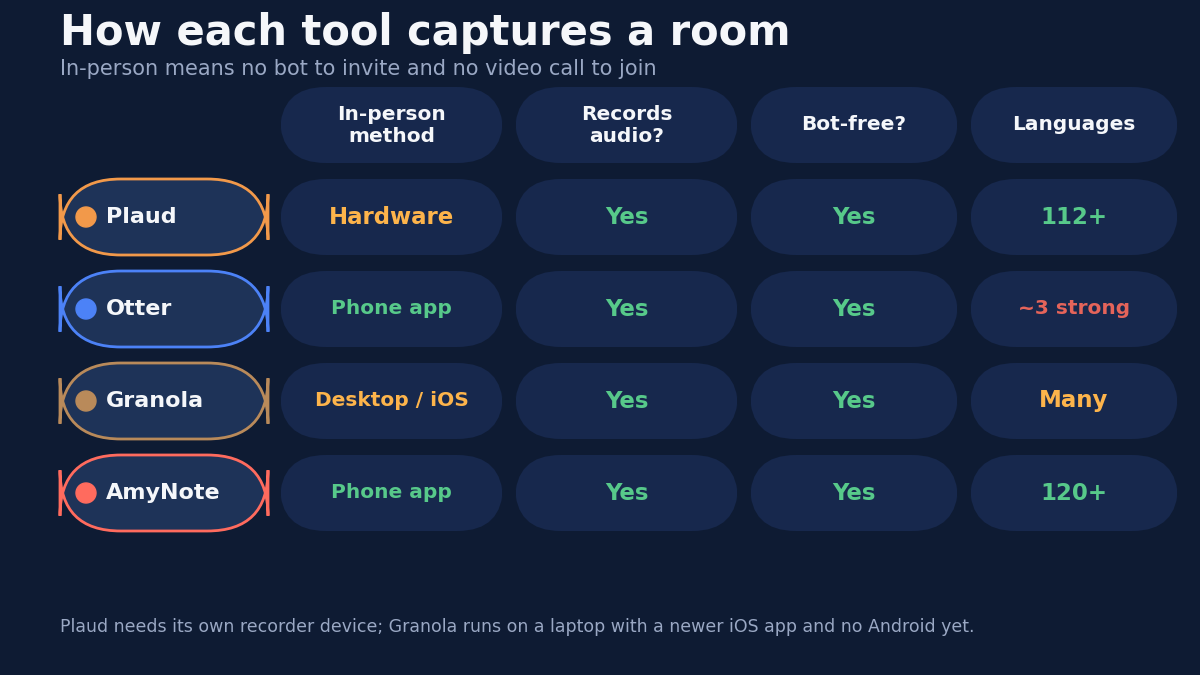
Plaud Note Pro: The Hardware Recorder
Plaud takes the most literal approach to in-person capture: a physical recorder, the Note Pro, that you set on the table and let run. It syncs to a cloud app that transcribes and summarizes afterward, so the device does the listening and the cloud does the thinking.
Strengths. A dedicated device means you are not draining your phone battery or leaving a laptop open across from a client. It handles long sessions comfortably, transcribes in 112+ languages, and the free Starter plan includes 300 minutes a month with full AI summaries. For people who record in-person constantly — field reps, consultants, journalists — the leave-it-and-forget-it form factor is the entire point.
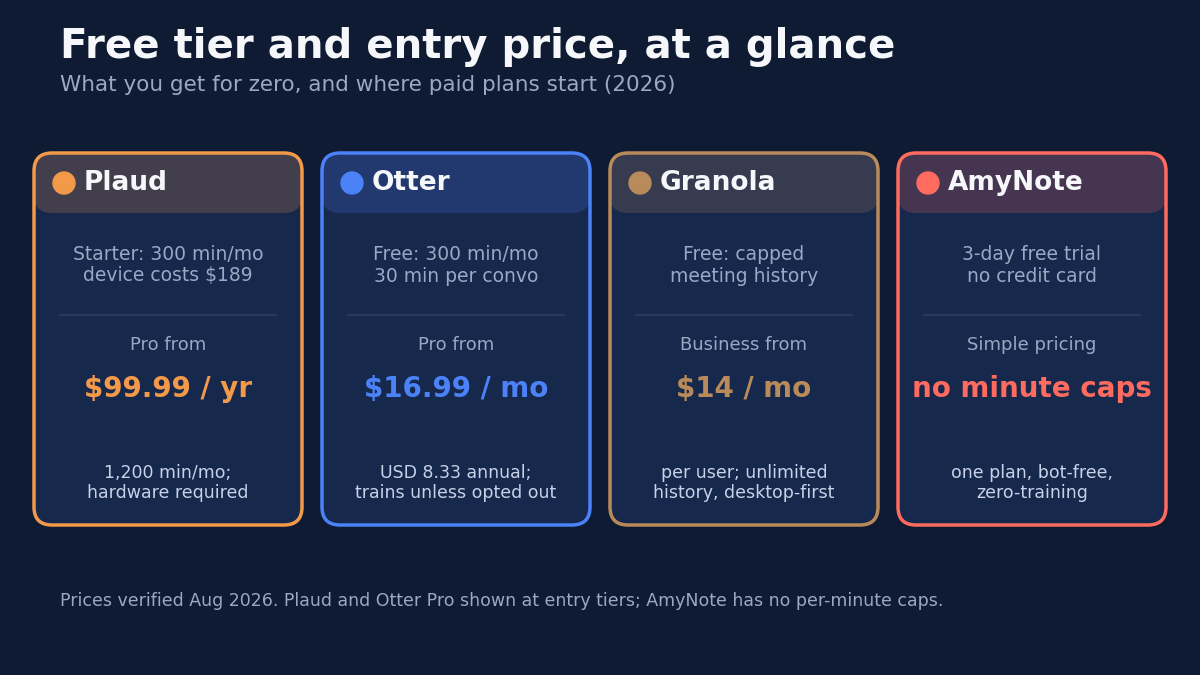
Weaknesses. You pay twice. The Note Pro device costs $189 up front, and meaningful volume needs a subscription: Pro is $99.99 per year for 1,200 minutes a month, and Unlimited runs $239.99 per year for up to 24 hours of recording a day. The AI features are cloud-dependent, so audio leaves the device to be processed. And it is one more gadget to carry, charge, and remember — the meeting you did not plan for is the one where the recorder is sitting on your desk at home.
Otter: The Familiar Mobile App
Otter is the best-known name here, and its mobile app can record in-person conversations straight from your phone with live on-screen captions. No hardware, no bot, just tap record and watch the words appear.
Strengths. A polished iOS and Android app, real-time captions you can follow as the meeting happens, and a brand most colleagues already recognize, which lowers the friction of pulling it out in a room. The free Basic plan gives you 300 minutes a month, enough to evaluate it on real meetings before paying.
Weaknesses. The free tier is narrower than it looks: 30 minutes per conversation and only 3 lifetime file imports, so a long in-person session gets cut off mid-sentence. Its strongest language support is limited to English, French, and Spanish, so multilingual rooms suffer. Transcripts are stored in Otter's cloud, and by default your data can be used to improve its models unless you opt out — a real consideration for candid, sensitive conversations. Paid Pro is $16.99 per month, or $8.33 per month billed annually, for 1,200 minutes.
Granola: The Private Desktop Notepad
Granola is the note-taker for people who sit down with a laptop. It listens through the computer's microphone, keeps the audio processing close to the device, and turns your rough notes into a clean summary. It is beautifully designed and privacy-minded, and for desk-bound work it is hard to fault.
Strengths. A distraction-free notepad that enhances what you type rather than dumping a raw transcript, with a private-by-default posture that suits sensitive work. The free Basic plan covers AI notes, Business at $14 per user per month adds unlimited history plus integrations, and Enterprise runs $35 per user per month for teams that need more control.
Weaknesses. It is desktop-first, built for Mac and Windows, which means opening a laptop in the room. A newer iOS app arrived in 2026, but there is still no Android app, and a laptop lid up on the table is not always welcome across from a client, a patient, or a witness. Granola is superb when you are already at a keyboard and awkward the moment you are not.
AmyNote: Phone-First and Bot-Free
AmyNote starts from the phone instead of adapting to it. Open the app, press record, and it captures the conversation in the room around you, with no bot, no browser extension, no extra hardware, and no laptop to depend on.
Strengths. It covers exactly the meetings the others strain to reach: client sessions, site visits, interviews, and hallway conversations, captured from the device already in your pocket. Transcription runs through OpenAI's Speech API and analysis through Anthropic's Claude Opus, with 120+ languages and real-time translation included rather than sold as an add-on. Speaker identification remembers voices across sessions, so the same client is labeled consistently from one meeting to the next, and a 3-day full trial needs no credit card.
Weaknesses. There is no desktop app, so a day wall-to-wall with scheduled browser calls is better served elsewhere. It runs no cloud bot and will not silently join a Zoom meeting on its own. There is no video recording, no CRM integration, and no team workspace yet, and it is a smaller brand than Otter. It does one job — mobile in-room capture — and does it well rather than pretending to do the rest.
Side-by-Side
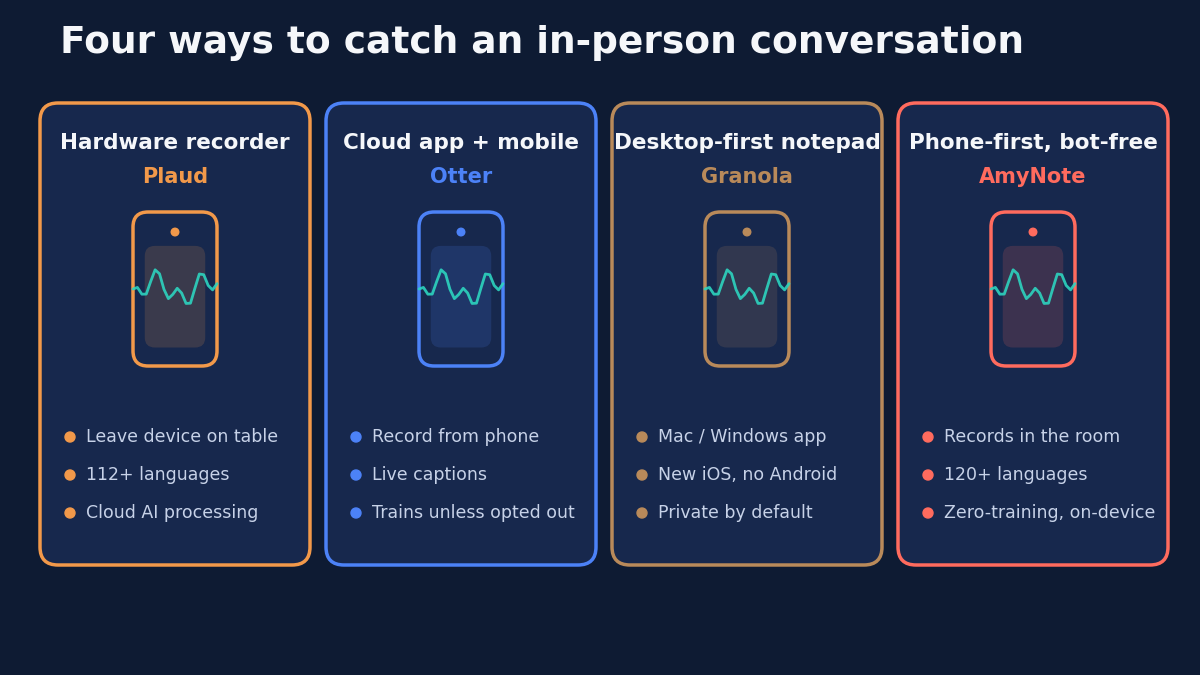
- What sits in the room: a hardware recorder for Plaud, your phone for Otter and AmyNote, a laptop for Granola.
- True mobility: AmyNote and Otter go anywhere on a phone; Plaud needs its device on hand; Granola expects a laptop open on the table.
- Languages: AmyNote leads with 120+ and included translation, Plaud offers 112+, Granola supports many, and Otter is strongest in only English, French, and Spanish.
- Paid entry: Granola $14 per user monthly, Otter $16.99 monthly, Plaud $99.99 yearly plus a $189 device, AmyNote a simple plan with no per-minute caps.
- Privacy standard: Both OpenAI and Anthropic contractually guarantee zero training on user data, and AmyNote stores transcripts locally with end-to-end encryption, while Otter may train on your conversations by default unless you opt out.
The Bottom Line
For an in-person meeting, the deciding question is simple: what is actually in the room to hear it? Plaud answers with a device you buy and carry, ideal if a dedicated recorder on the table fits your work. Granola answers with your laptop, best when you already take notes on a screen. Otter answers with a capable phone app, as long as your meetings live in English, French, or Spanish and you accept its default data policy.
But if the meetings you keep losing are the candid ones — in rooms and on job sites and in other languages, captured from the phone in your pocket with nothing left behind in a vendor's cloud — that is the exact shape AmyNote at amynote.app was built for, and the 3-day trial with no credit card makes the test cheap.
Originally published as an X Article by @AmyNoteApp.